

The Schedule Add-on now includes vacation days, holidays, and work calendars. Improvements have also been made to cost planning, BOQs, billing, ÖNORM, API, etc.
The October 2026 update is also documented in this PDF.
Scheduling Around Vacations and Holidays
Our Scheduling add-on has received a whole host of new features and improvements. For example, the add-on can now handle school breaks, holidays, vacations, and precisely defined work calendars.
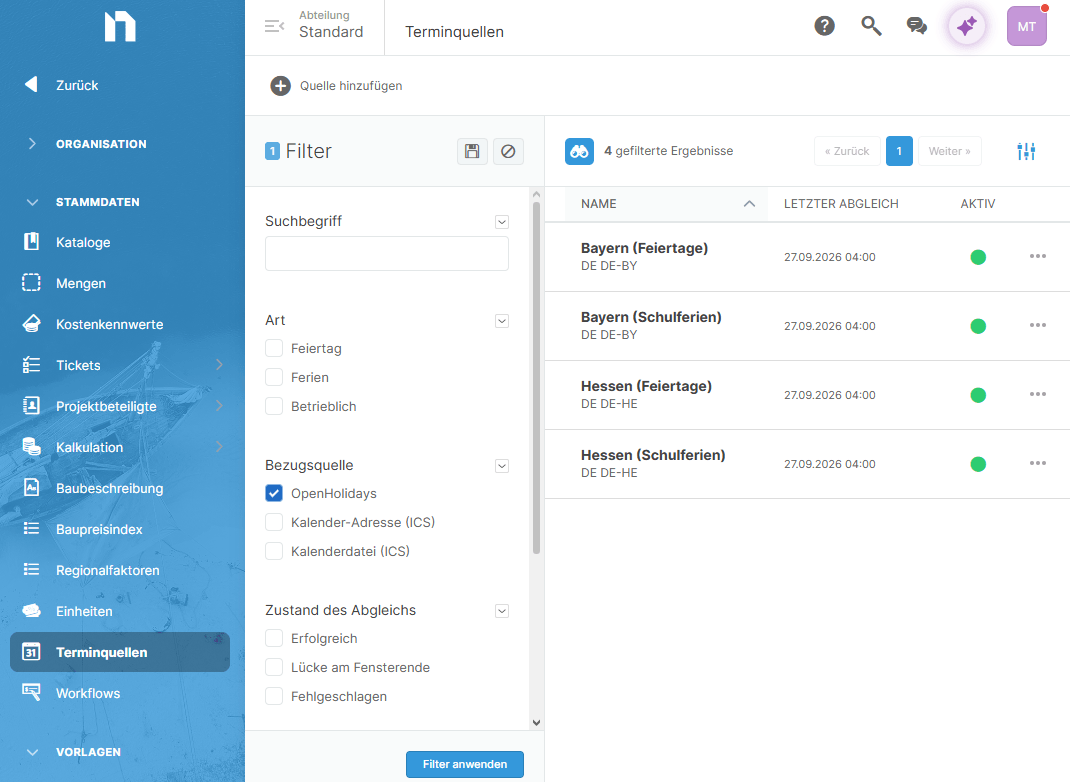
Effective immediately, country-specific vacation and holiday calendars from the open-source source “OpenHolidays” can be integrated.
This is done through Department Administration / Appointment Sources
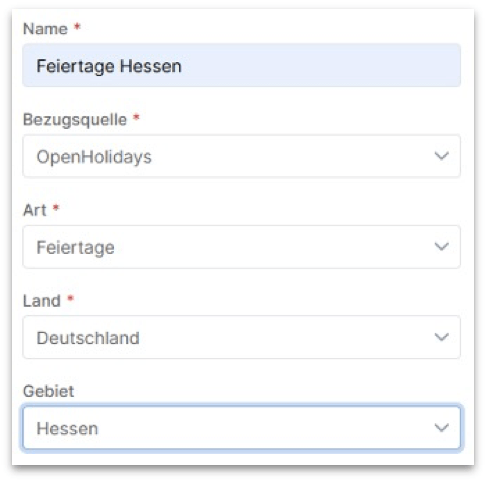
We’ve also thought about importing or linking your own calendars in ICS format—for example, to record company and employee vacation periods.
Work Calendar in the Schedule
Work calendars can now be defined in schedules.
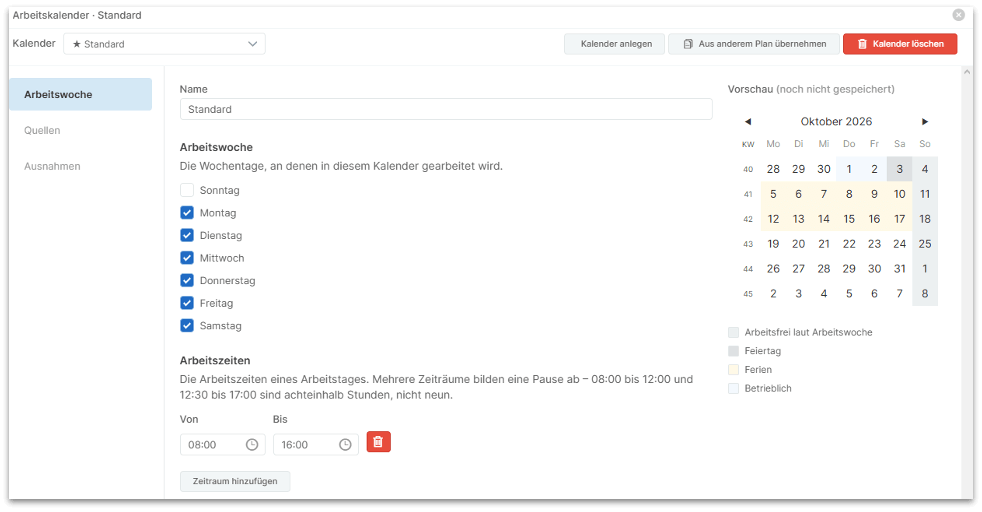
Such a work calendar defines:
- Weekdays on which work is performed,
- Hours worked per day,
- Exceptions such as vacations, holidays, and
- Flexible time off that can be scheduled at your convenience.
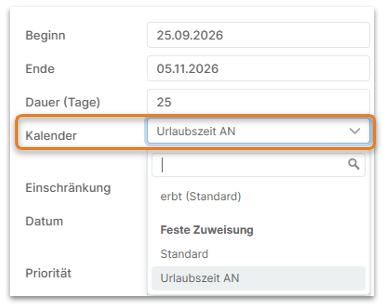
In addition, such work calendars can also be explicitly assigned to operations, for example, to account for vacation periods by trade or by operation.
Clearly presented in the schedule and intelligently processed
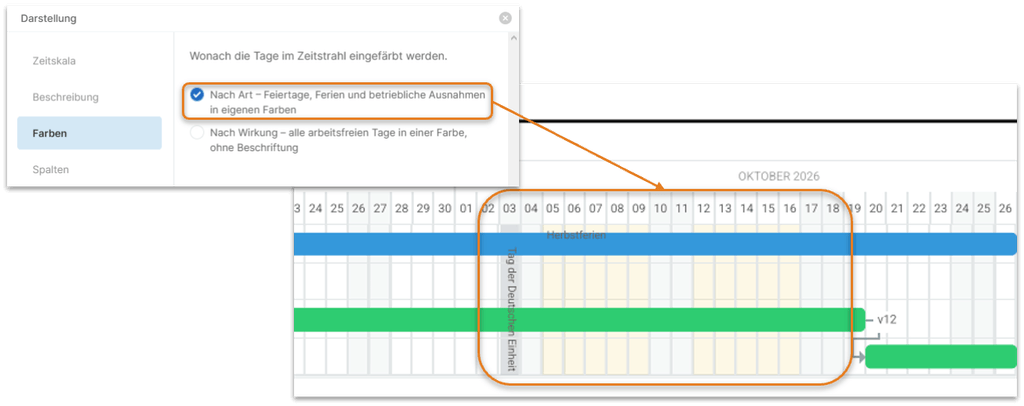
Vacation days and holidays are highlighted in the calendar. Tasks are automatically extended based on the settings.
Schedule with Improved PDF Output
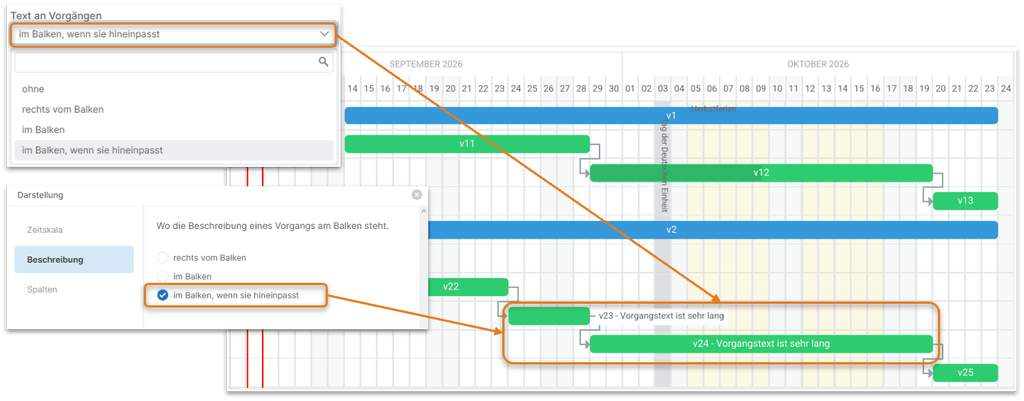
When a schedule is exported as a PDF, you can now use custom templates for the cover page, headers, and footers. In addition, task descriptions can now be included in the printout either within the task bar of the GANTT chart or to the right of it.
Filter Schedule
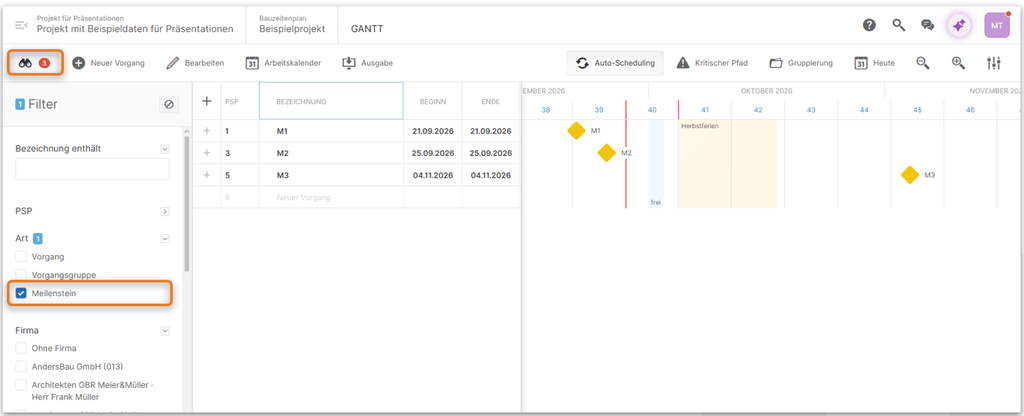
Extensive filtering options are now also available in the schedules. This allows you to quickly filter, for example, tasks by a specific color or company and export them as PDF or Excel documents.
Archive Schedule
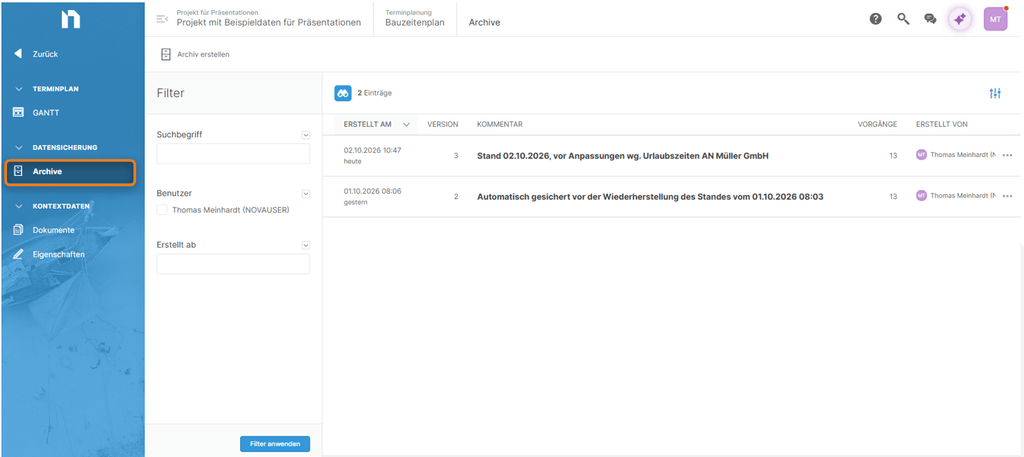
Archives can now also be created for schedules; these can be viewed at any time and restored as well.
Cost Planning: Automatically Inserting Copied Calculation Rows
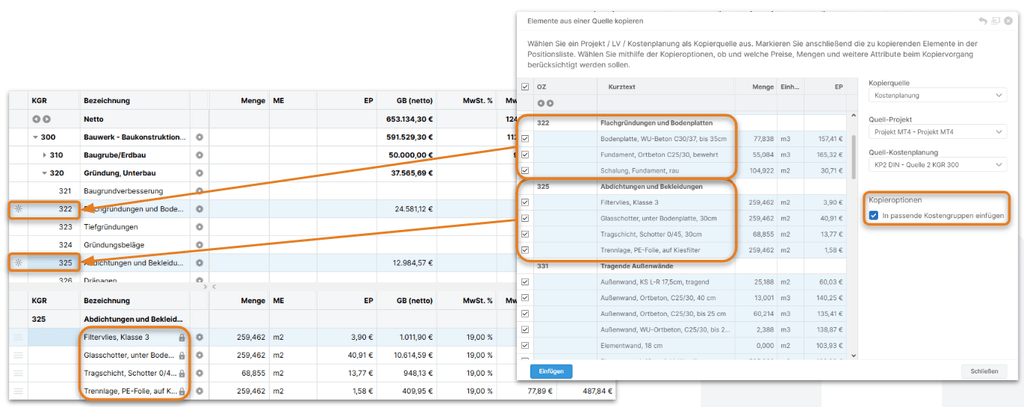
Previously, when copying calculation rows from other cost plans, all selected rows were always inserted at the marked location in the target cost plan. With a new copy option, all selected rows are inserted at the “correct” target cost group number, based on the source KGR assignment.
Automatic Numbering for Calculation Rows
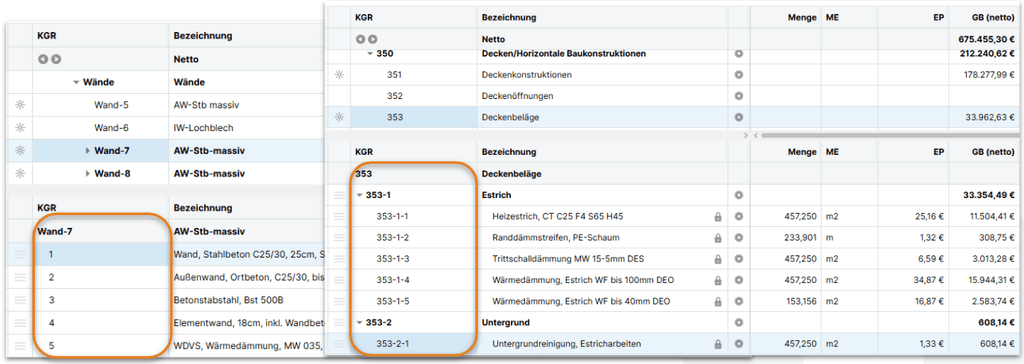
In response to numerous requests, all calculation lines in cost planning now receive automatically generated numbers. For catalog-based cost planning, the cost group number is prefixed to the calculation line numbers (e.g., in DIN-KGR 353: 353-1, 353-2,…) For BOQ/BIM-based cost estimates, this is not done due to the generally longer BOQ/component names. The calculation line numbers can optionally be included in the PDF/Excel output.
Creating BOQs: Simpler Text Editing
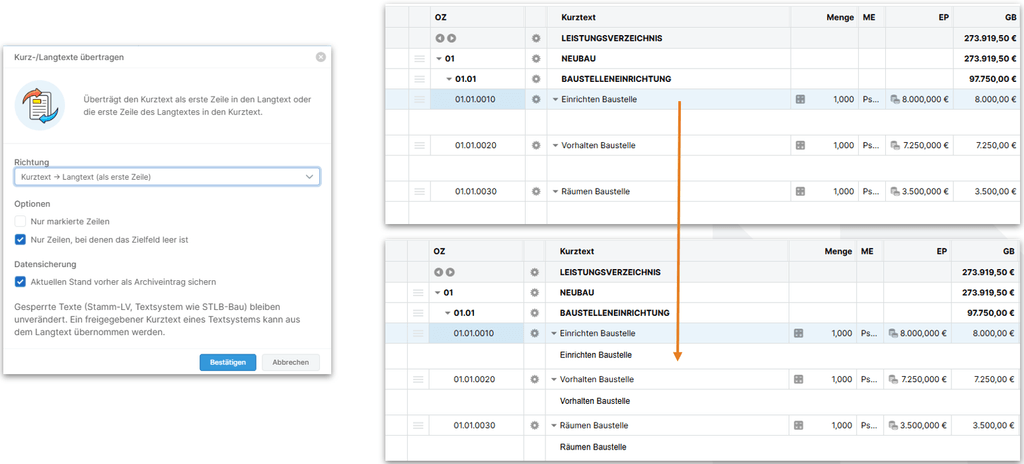
We have added a feature that allows you to use short descriptions as the first line of the long description, or the first line of the long description as the short description, for all or selected items. The new feature is located in the Tools menu.
Overview of Additional Improvements, Not Just in the Schedule
| Schedule | When printing multi-page schedules, the schedule header now appears on every page. |
| In schedules, the expanded/collapsed state of tasks is now retained even when the schedule is reloaded. | |
| When auto-scheduling is disabled, editing task groups no longer causes the tasks within the task group to be automatically adjusted. | |
| Entire transaction groups, as well as individual transactions, can now be locked for editing, thereby protecting them from accidental changes. | |
| The list of project participants is now also available for selection by the company responsible for the tasks. | |
| In the calendar, you can use the new “Today” button to jump directly to the current day, week, month, or year. | |
| The navigation and scrolling behavior when deleting and inserting tasks has been improved. |
| Editing predecessor/successor entries directly in the task list has been improved, and the sorting order has been changed to prioritize from highest to lowest. | |
| We have made improvements to selecting, deleting, and highlighting tasks in the task list. | |
| Improvements have been made to the Excel export of schedules, particularly regarding the display of calendar weeks in the columns. | |
| Milestones are now displayed and reported in the daily view exactly on the day itself, rather than on the daily divider line. | |
| The system now prevents the creation of multiple identical task links. | |
| By enabling the critical path, the ability to scroll through the schedule is no longer lost. | |
| In the schedule, certain actions will no longer cause the order of tasks to change after the schedule is reloaded. | |
| In the PDF output dialog, the “Set Project Timeframe” function now sets the correct start and end dates based on the schedule activities. | |
| For long schedules, you can now specify in the print settings how many lines the GANTT chart header should be repeated after. | |
| Touchscreen functionality—for example, on smartphones and tablets when viewing schedules—has been significantly improved. | |
| In the schedule settings, you can now specify whether a new task should be created today, on the start date, or after the selected task ends. | |
| The PDF output dialog for schedules has been made slightly more user-friendly and brought in line with other output dialogs. |
| Security | In addition to OTP codes sent via email or an authentication app, passkeys are now also available in NOVA AVA as a form of two-factor authentication. |
| Building documentation | When editing the list of attendees in a construction log entry, corrections were made regarding attendance times and the “Full Day” option. |
| Cost planning | The “Only rows with values” print option for cost estimates now correctly accounts for nested levels in the calculation rows. |
| When a cost plan is exported as a PDF, the key data is now included in full, along with the formula and calculation. | |
| Overwriting existing cost elements is now only possible if the general permission to edit cost elements has also been set. | |
| For cost planning archives, the archiver is now correctly displayed as the creator, rather than the creator of the cost plan. | |
| LV creation | The function for writing back modified text to the master BOQ is also available for cross-departmental master BOQs if STLV items in a project BOQ have been released while retaining the STLV reference, and the current user has write access to the relevant master BOQ. |
| When saving project/BOQ properties, a warning is now displayed if any required fields are missing, even if the tab containing the missing required field is not the active tab. | |
| In the table’s long-text editor, autosave now works again after a certain number of characters have been entered or after a certain amount of time has elapsed. | |
| Corrections were made to a custom interface. | |
| Text editor | Improvements have been made to the process of copying Excel spreadsheets via the clipboard into the long text of BOQ items. |
| A course syllabus is now printed correctly without a cover page, header, or footer, and without repeating the first section. | |
| Invitation to tender | In the “Call for Proposals” module, the date of the most recent invitation is now displayed permanently, even if the participant’s access has expired or the participant has been invited again. |
| Measurement | For items that have been closed, editing of calculation entries is now blocked across the board. |
| Target vs. Actual | When exporting the target-actual comparison to Excel, the percentage completion rate is now included in a separate column. |
| Billing | Uploading attachments to a “shared” invoice using drag-and-drop is now correctly prevented. |
| General fixes have been made to the process of uploading attachments to an invoice using drag-and-drop. | |
| The system now prevents the deletion of invoice deductions (net/gross) that have already been used in previous invoices; the values (percentage/amount) are automatically set to 0.00, and a corresponding message is displayed. | |
| GAEB | The GAEB-XML import has been made more tolerant of incorrectly entered standard service numbers (StlNo) in the GAEB file. |
| ÖNORM | It is now possible again to copy free positions (Z-positions) between LVs with differently referenced LBs. |
| The insertion of permanent preliminary remarks regarding the LB into LVs organized by OG has been corrected. | |
| When creating an ÖNORM specification, the “Save and Open” button now works as expected. | |
| API | The REST API has been enhanced with functions for renaming (Name & Description), copying, and deleting LVs. |
| Quantity Variables | Conditions can be defined using operators in quantity variables. All operators (==, !=, <=, >=, ) can now be used correctly here. |
| Extensive lists of quantity variables are now displayed in their entirety in cost estimates and preliminary BOQ calculations, and the selection process now takes into account numbers included in the variable names. |