

August 2026 Update – Version 2: New Team Messenger, faster access to archives and versions, and many ÖNORM improvements.
The August 2 update is also included in this PDF .
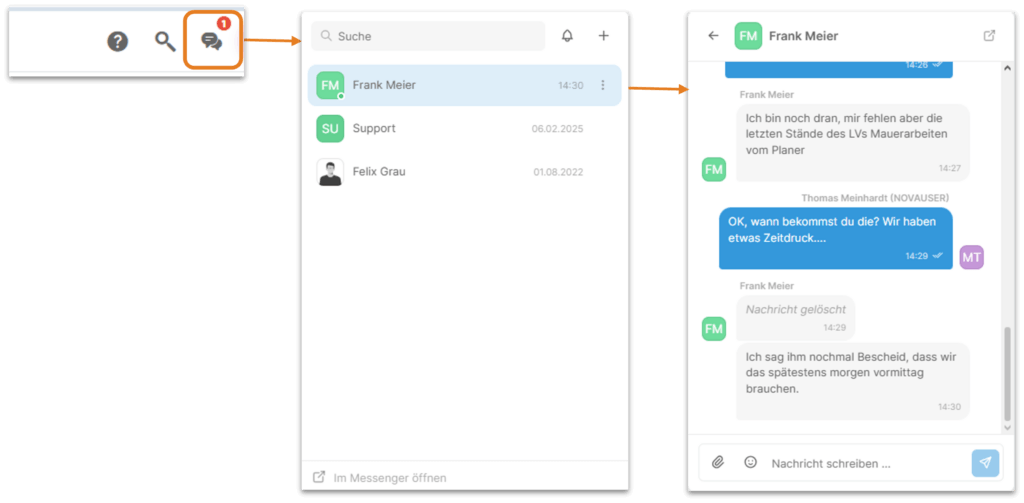
The New Messenger
Teamwork becomes even more efficient when you can quickly and easily get information and send messages. We’ve optimized Messenger—just give it a try!
Archives and Versions – Improved Access
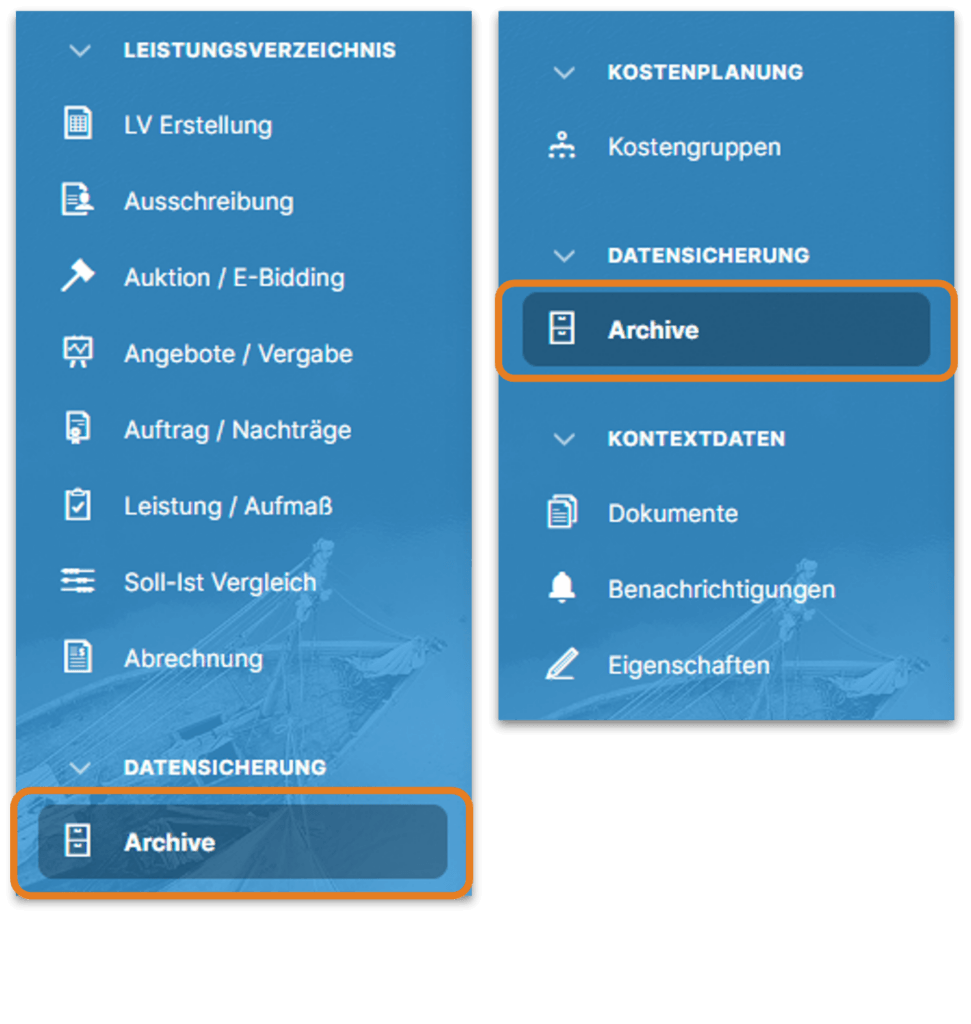
It has always been possible to create a backup of a LV using the archiving function. However, we had hidden this important feature a little too well 🙂
Starting now, you’ll find this prominently displayed in the sidebar, when the BOQ is open, and when the cost planning is open.
Improvements must be made. And bugs out.
| ÖNORM | Obtaining supplementary bids is now incredibly easy, even in ÖNORM specifications. Effective immediately, addendum items can be exported directly from the Order/Addenda module in the ONLV format “Tender BOQ.” And of course, we’ve also thought about the reverse process: importing the contractor’s bid data in the ONLV format “Supplemental Bid BOQ.” |
| ÖNORM | In ÖNORM specifications, images from the item properties can now be optionally included or omitted in the PDF printout. |
| ÖNORM | Effective immediately, a new feature in the “BOQ Creation” module allows for the renumbering of outline levels and items in ÖNORM BOQs. Of course, static sequence numbers from existing line item positions are not taken into account in this process, and when renumbering free-text items and free outline levels, only sequence numbers that are not already in use in a potentially referenced line item are used. |
| ÖNORM | Copying between ÖNORM specifications with different structures has been improved. |
| ÖNORM | In ÖNORM specifications, items or service groups within a service area (LB) can no longer be manually renumbered, as this is no longer permitted. |
| ÖNORM | The automatic generation of ordinal numbers for new organizational levels/positions, as well as the validity checks of these ordinal numbers performed by the BOQ check, have been improved and now take the ÖNORM specifications into account in even greater detail. |
| ÖNORM | In ÖNORM specifications, when using items from item lists, free-text items (Z-items) must not be created with serial numbers that are already in use in the referenced item list. Effective immediately, NOVA AVA supports the creation of free-text line items by allowing users to specify their own serial numbers, and when assigning serial numbers manually, it checks whether the desired serial number is already in use in the line item library. |
| ÖNORM | When generating a PDF of ÖNORM specifications, it is now possible to optionally include only the long texts for basic text items. |
| ÖNORM | When exporting or importing bid specifications via ONLV, the “Not offered” flag is now processed correctly. |
| ÖNORM | The ONLV exports from NOVA AVA have been updated to comply with ÖNORM A2063 as of July 15, 2015. |
| ÖNORM | In free-text items (Z items), you can now also insert additions to the full-text description (gaps in the full-text description) in the long text. |
| ÖNORM | The export of addendum items in the ONLV format “Contract Adjustment BOQ” has been optimized. |
| ÖNORM | Addenda items can now also be imported into an existing contract in ÖNORM BOQs using the ONLV format “Contract Amendment BOQs.” |
| ÖNORM | In the Print Designer, placeholders for the properties of data entry sheets are now also available for selection. |
August 2026 Update 01: Flexible columns in overviews, brand-new GAEB X50/X51, automatic generation of cost planning items from the BOQ, and much more.
The August 2026 01 update is also available in this PDF document.
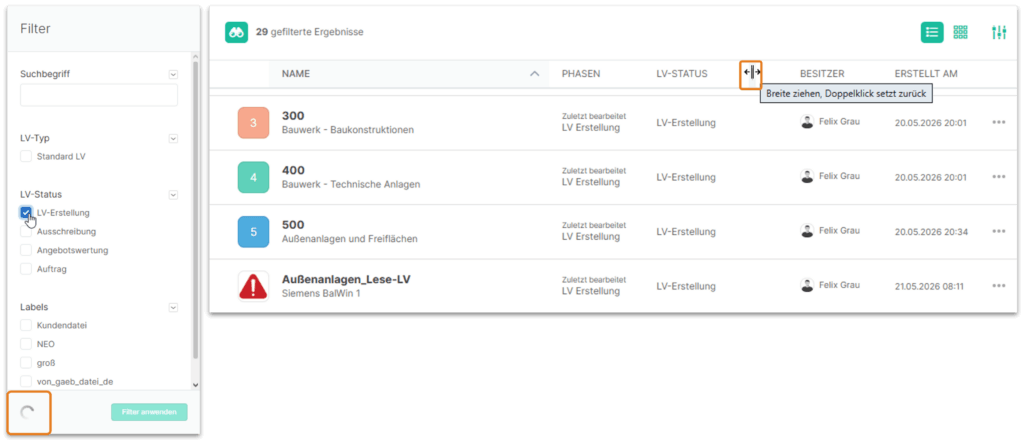
Adjust column widths in overviews and use faster filters
You can now customize the column widths in all overviews. In addition, the filters in the overviews now immediately display the results based on your filter selection, without having to explicitly click “Apply Filter.”
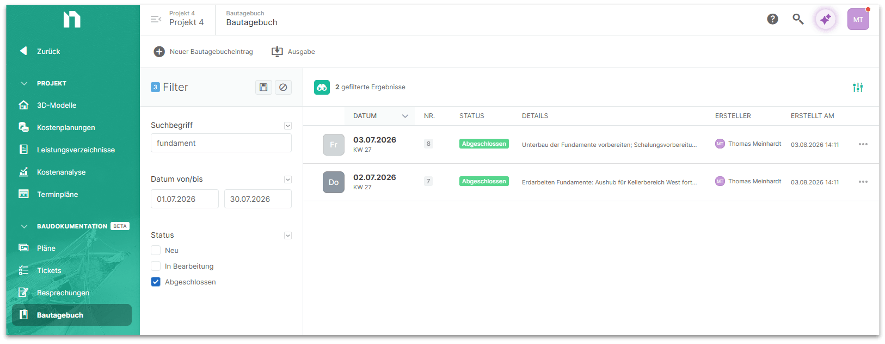
New List View in the Construction Log with the August 2026 Update
In the construction log, we’ve redesigned how entries are displayed and implemented a list view.
This makes the entries much easier to organize, and they can now be sorted and filtered, as well as printed using a new print list.
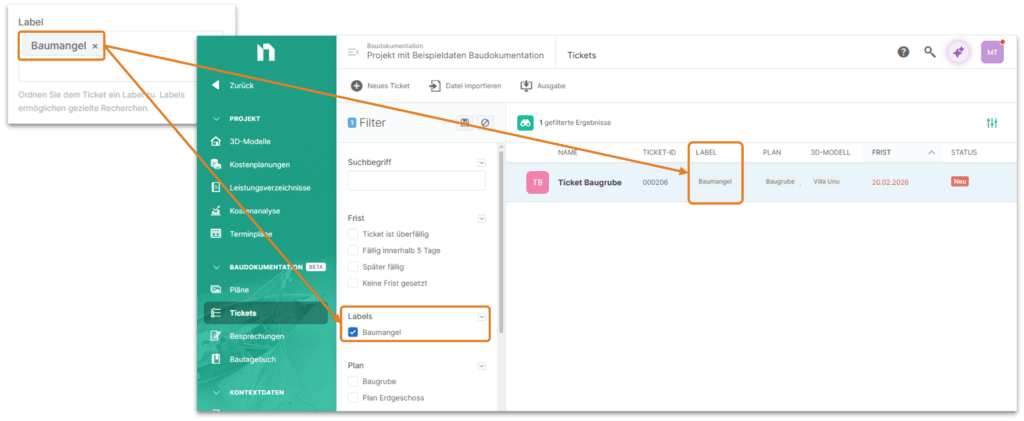
Labels for Tickets, Meetings, and Minutes
Tickets, discussions, and meeting minutes can now be individually categorized and filtered using labels.
Better Distinction Among Project Participants
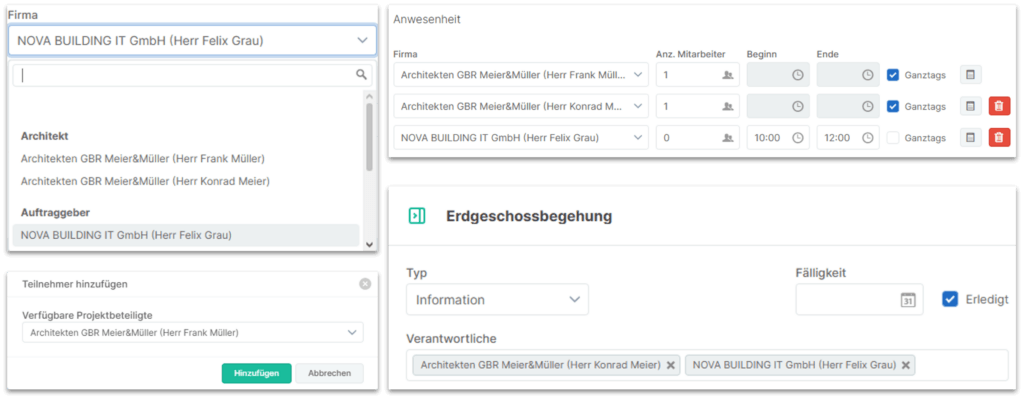
To make it easier to distinguish between different contacts at a company, the contacts are now displayed when selecting a company for ticket assignees, meeting participants, the person responsible for a meeting minutes entry, and those present in a construction log entry.
GAEB Data Exchange – X50 and X51 Completely Redesigned
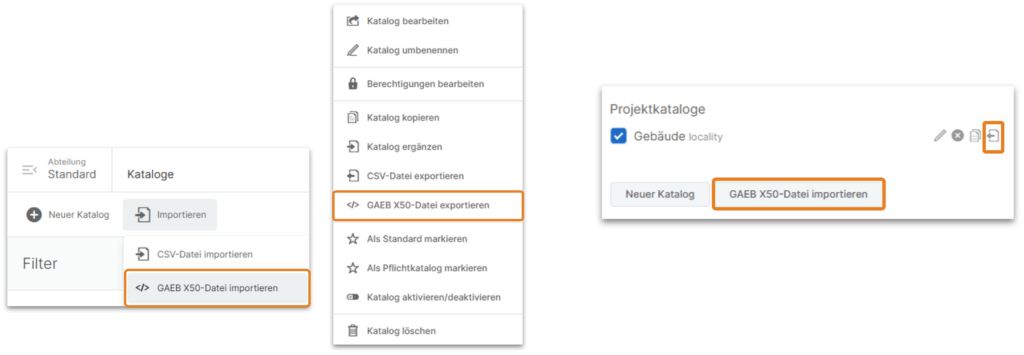
In the Department Administration section, catalogs can now be imported in X50 format, and existing catalogs can be exported.
In the Project Properties section, you can now export and import existing project catalogs.
GAEB Data Exchange – X50 and X51 Redesigned
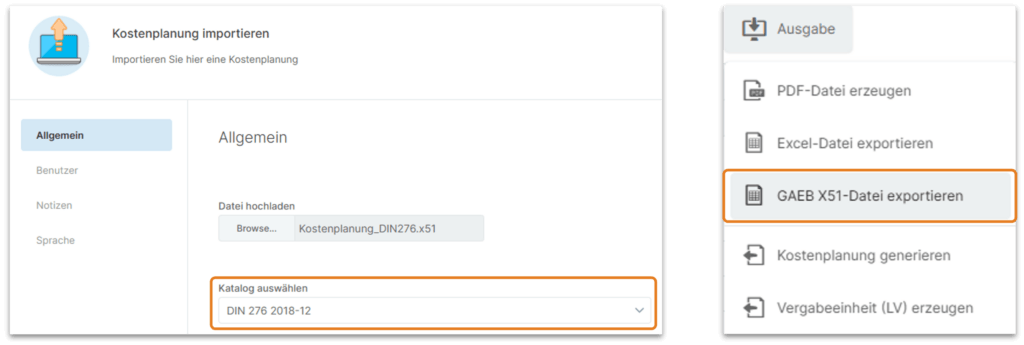
In the Cost Planning module, cost estimates, cost calculations, etc., can be imported using the GAEB-X51 format. To do this, you must select a catalog with the underlying cost structure for each entry. If the corresponding catalog for the cost structure is missing, it can be imported in X50 format—either as a global department catalog or as a project catalog. To export a cost plan in X51 format, use the Export menu in the cost planning module.
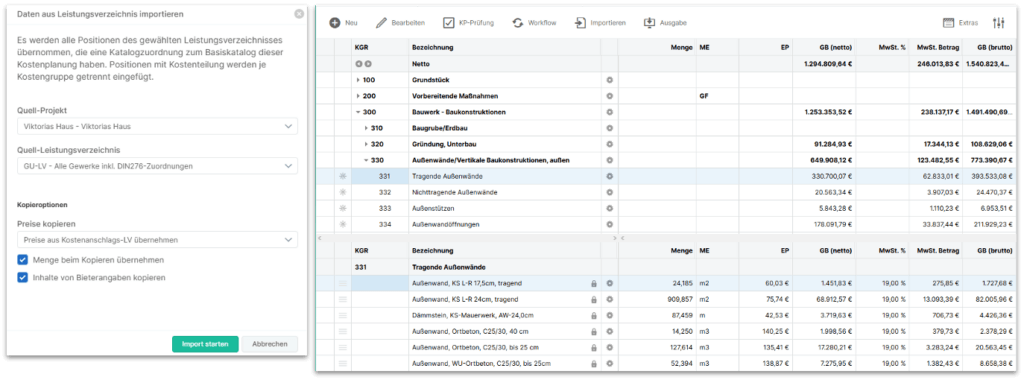
Automatically populate cost estimates with line items from the BOQ
How can I create a cost estimate based on one or more bills of quantities, for example, in accordance with DIN 276? Until now, this was a time-consuming process that involved a lot of manual copying. Now it’s practically automatic: Simply select the bills of quantities, and all line items are automatically assigned to the correct cost group.
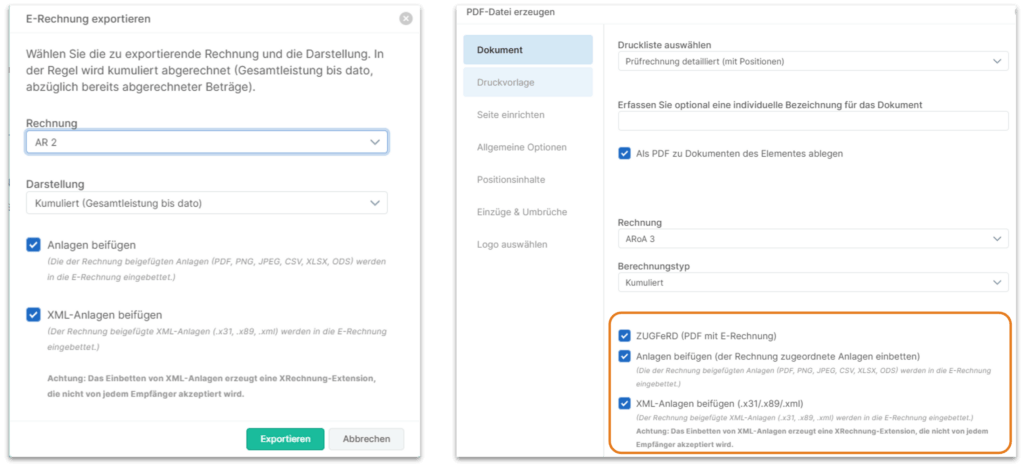
Issuing Invoices as XRechnung or ZUGFeRD
In the billing module, the (draft) invoices generated in NOVA AVA can now optionally be exported in either the XRechnung format (pure XML invoice) or the ZUGFeRD format (PDF with embedded XRechnung).
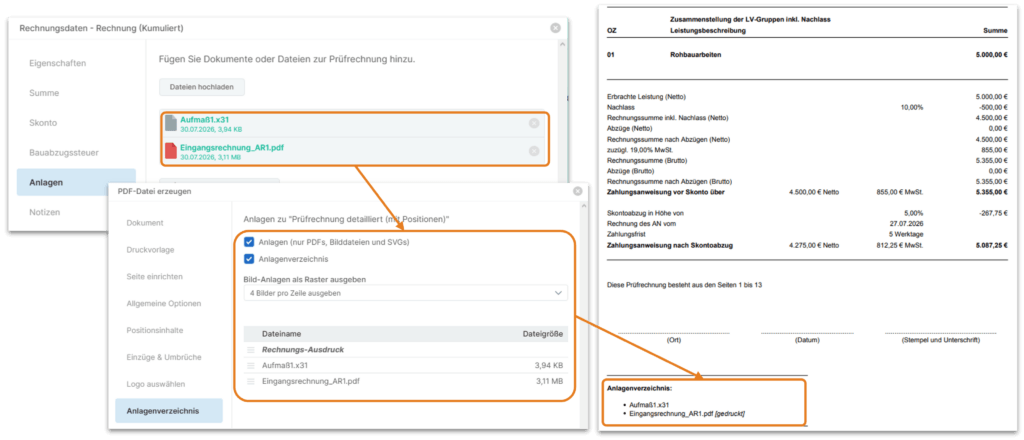
Attachments to Test Invoices with Expenditures
When generating invoices, you now have the option to embed the attachments for an invoice (e.g., contractor’s incoming invoice, underlying measurement data, etc.) directly into the PDF file. These are included as complete documents, along with a list of attachments.
Notifications—Faster and More Organized
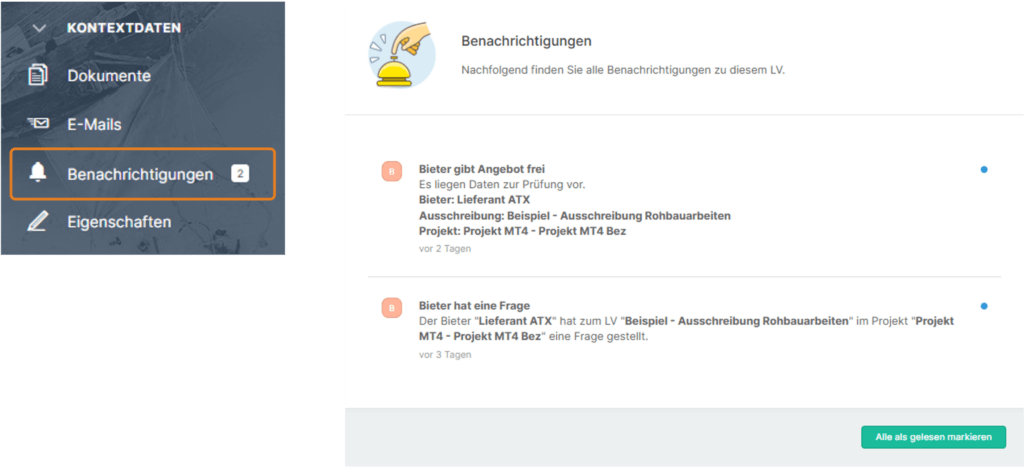
In NOVA AVA, notifications keep you up to date. This way, you’ll be notified when a bidder has submitted a bid or when you need to edit a BOQ. Previously, this information was only listed centrally and in chronological order. Starting now, you can also see directly on the project or the BOQ itself whether there are any updates and, if so, what they are. In addition, groupings make the central list of notifications easier to navigate.
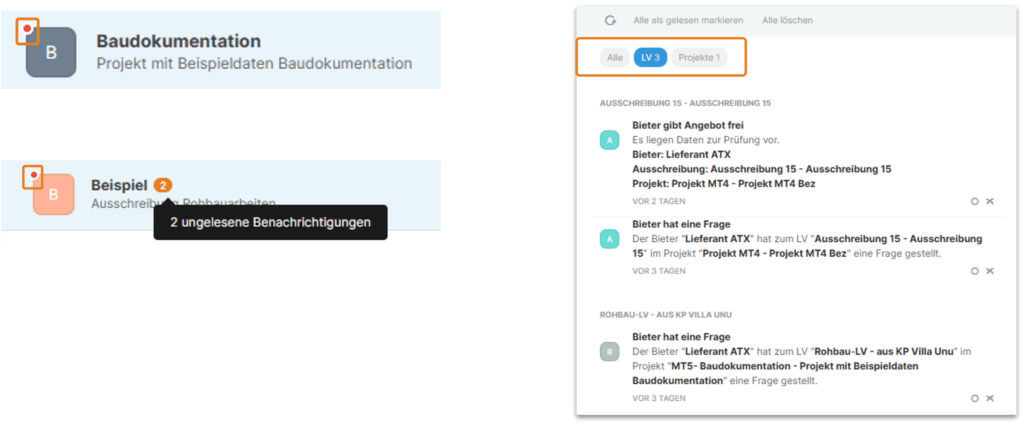
In BOQs and cost estimates, you’ll now find a “Notifications” entry in the context sidebar. It lists all unread notifications related to that cost estimate or BOQ.
Email Sending – Standard OAuth2 Implemented
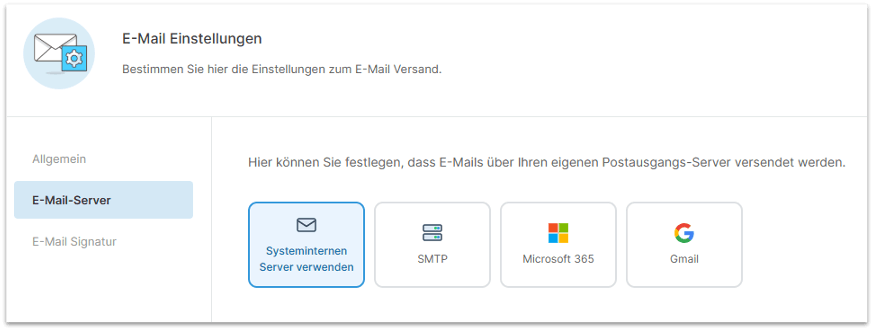
NOVA AVA sends emails, for example, to request quotes. You now have more flexibility in choosing how these emails are sent. To this end, we have implemented the OAuth2 standard. You can continue to use the NOVA AVA service to send emails, use your own SMTP server, or send them via Microsoft or Google.
Sign in to NOVA AVA – SSO via an external IdP
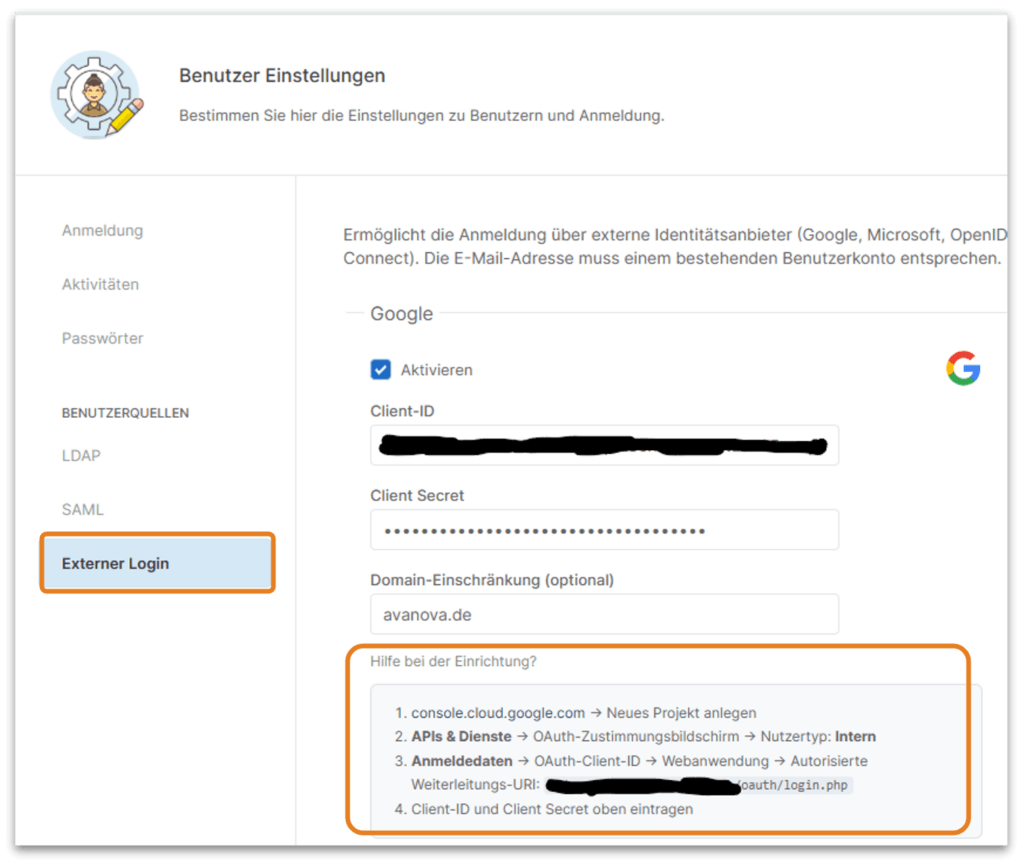
Thanks to the new support for Single Sign-On (SSO), you can now log in to your NOVA AVA business account directly through external services such as Microsoft, Google, or Generic OpenID Connect.
This must be configured separately. For Google and Microsoft, NOVA AVA provides detailed setup instructions to help you get started.
Simplified Editing of Master BOQ Line Items
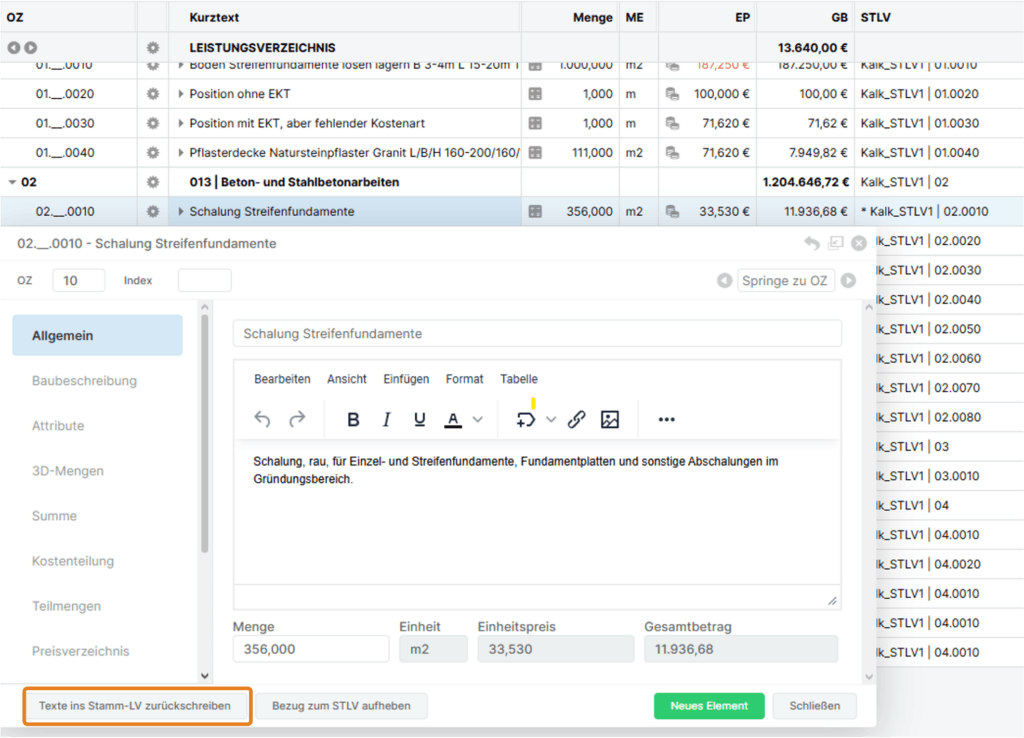
You copy an item from the BOQ into a project and realize that the text needs to be changed.
To do this, enable editing using the “Maintain reference to BOQ” option and change the text in your project BOQ.
In the past, to update the text in the master BOQ as well, you had to switch back to it and make your change again.
This is now much easier with the new feature: “Write texts back to the master BOQ”
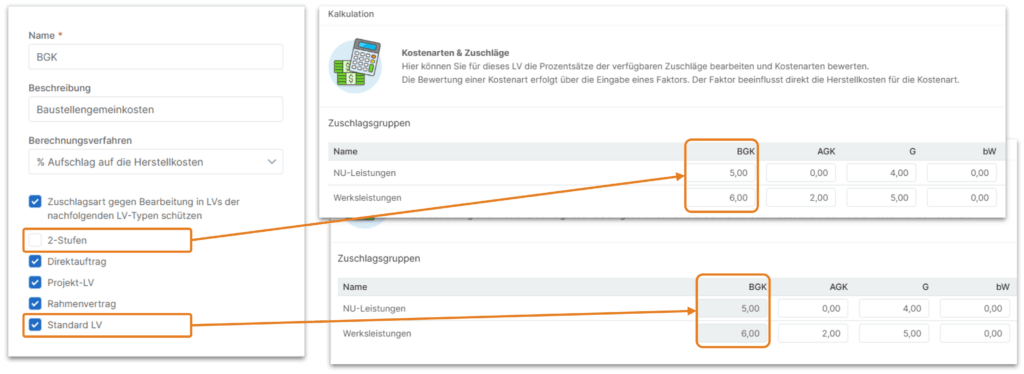
Protect Overhead Types in Cost Estimation from Editing
Previously, it was only possible to define at the department level whether a surcharge type could be customized individually in all BOQs or whether editing of that surcharge type was locked. Now it is possible to define the editing lock based on selectable BOQ types.
Improvements must be made. And bugs out. Update: August 2026
| General | It is now also possible to manually enter date fields using only a 2-digit year. |
| General | Every NOVA AVA user can now enter or update their personalized login credentials for STLB-Bau Online and DBD-BIM in the “External Services” section of their NOVA AVA profile. |
| General | The “eSignature” add-on has been functionally updated to reflect recent changes made by Adobe Sign and DocuSign. |
| Schedule | The scaling of the logo in schedule PDF outputs has been adjusted to match the scaling used in the other program modules. |
| Calendar | In the global and project calendars, the “Back” button did not work for navigation, and clicks in the mini-calendar sometimes resulted in incorrect navigation. Navigation now works in all views. |
| Project participants | When generating the list of project participants, you can now choose whether or not to include the “Bill of Quantities” column. |
| Building documentation | When you create or duplicate a log, the (new) log will now automatically be assigned the current date. |
| Building documentation | The feature for sending logs via email from the log overview has been removed. However, you can still print and send logs via email from the open log, taking into account any filters that have been set (color filters/Completed status). |
| Building documentation | The “Ticket Overview” print list now correctly applies the “Filtered Results Only” print option. |
| Building documentation | You can now quickly duplicate existing tickets using the context menu in the ticket overview. |
| Building documentation | In all printed editions, the names of attendees, participants, and responsible parties are now listed alongside the company name, along with the respective contact person, to make it easier to distinguish between them. |
| Building documentation | When filtering the output of ticket, log, and construction diary overviews, the selected filter settings are now also displayed on the cover page and in the header for better documentation. |
| Cost planning | When exporting or importing cost planning using the GAEB-XML-X51 format, the catalog assignments for the cost planning lines are now included in the transfer. |
| Cost planning | Images can now also be uploaded or inserted in the long-text editor for calculation lines in cost planning (as has already been possible in work specifications). |
| Cost planning | Placeholders for the project and cost planning can now also be used in the long text fields of the calculation lines in cost planning. |
| Cost planning | When a cost plan is exported as a PDF, disabling the data filter now actually turns off any previous filters. |
| Cost planning | When cost estimates are exported to Bills of Quantities, the classification of BOQ items into the cost groups of the cost plan is now correctly taken into account, and any assignments of the source BOQ items are no longer included. |
| Cost planning | The import function in the proprietary BKI-XML format for new cost planning has been removed, as cost planning data from BKI can now be imported via the standardized GAEB-XML-X51 interface. |
| Cost planning | When inserting items from BOQs into cost estimates, there is a new option: “ ” This option allows you to control whether BOQ items without a total amount (contingencies, alternatives, etc.) should be automatically set to “deactivated” in the cost estimate and thus excluded from the calculation. |
| BOQ Overview | The function for copying entire BOQs in the BOQ overview has been significantly optimized for performance. Even complex BOQs with many catalog assignments are now processed quickly. |
| LV creation | Copying items from other bills of materials has been optimized for better performance. |
| LV creation | Inserting and saving text blocks now works not only for item long texts, but also for long texts in construction descriptions. |
| GAEB-XML | In the GAEB-XML export, optimizations were made to the stylesheet specifications for lines containing nested formatting instructions of different types. |
| Invitation to tender | The English and French standard email templates for the “Confirmation upon Acceptance of a Quote” email type contained errors and have been corrected. |
| Suppliers | As soon as it becomes necessary to review the legal documents submitted for a new supplier account, all users with access to Supplier Management will receive a notification in NOVA AVA. |
| Offer/award | Previously, it was possible to place orders for archive offerings from bidders; this has now been correctly discontinued. |
| The output of tender text additions as PDF files now works perfectly. | |
| In the PDF output of the unit price components, a currency code is no longer included with the time rate. | |
| Corrections have been made to the PDF output regarding the handling of activated logos. | |
| The print output of the job specifications, including EP breakdowns and their totals, has been improved |
| Administration | The Excel export of the role-permission matrix from Department Administration now once again includes information on activated/deactivated permissions (populated matrix). |
| Administration | In the department administration module, it was not possible to edit or delete workflow steps correctly using the context menu (right-click). This has been corrected. |
| Administration | When catalogs are added via CSV import in the department administration, the “Ignore header row in CSV” import option now works correctly. |
| Administration | Labels containing special characters (e.g., “&”) are now processed correctly. |
| API | The REST API documentation has been migrated to a different documentation tool and updated to the latest version. You can now find the API documentation at https://[TENANT].avanova.de/api.php/v1/docs (where TENANT is your NOVA AVA subdomain) |
| API | When adding catalogs via CSV files using the API, the process of inserting new rows into the existing catalog has been improved. |
| API | The API now provides the statuses of performance sheets (externally submitted performance sheet / approved for billing / included in the invoice). |
| API | The API endpoint for supplier ratings now always correctly returns the ID of the respective supplier as “supplier_id.” |
| API | The search/filtering via API for different values within a field (OR search) has been corrected. |
| API | For the cost analysis API endpoints, the IDs of the BOQs (boq_id) and line items (boq_node_id) are now also included for optionally provided BOQs and line items to facilitate better reference. |