

Update February 2026: new GAEB data exchange for supplements, extended placeholders for PDF, integrated image processing for projects and much more.
All of the following information on the February 2026 update can also be found in this pdf document to find. You can also find the information on the major February update of the construction documentation in this extra article.
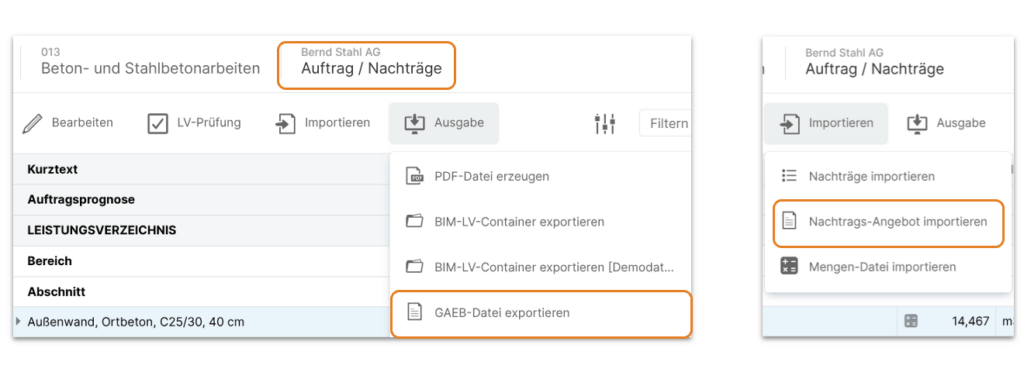
Supplement negotiation via GAEB data exchange
The February 2026 update makes it really easy to obtain supplementary quotations. From now on, supplementary items can be exported directly from the Order/Supplements module as a GAEB X83 file. And, of course, we have also thought about the way back: importing the contractor’s quotation data in GAEB X84 format.
Placeholder for individualized PDF outputs
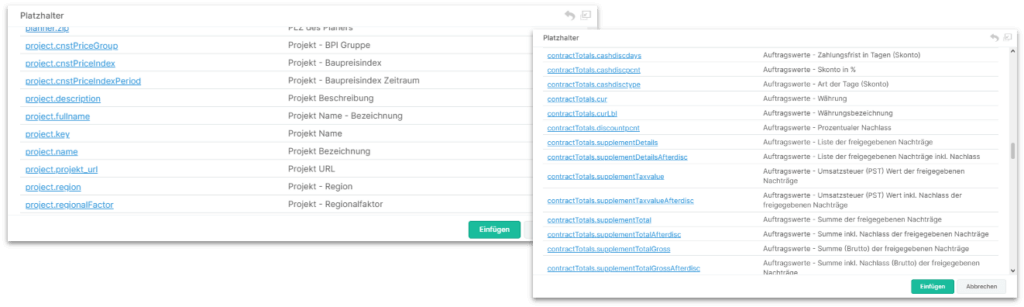
The placeholders for individual print lists and email templates were not equally available in all modules. It has now been ensured that all placeholders can be used in all print lists and emails across all modules.
For invoice verification in particular, all total values for the main contract and supplements can now be used via placeholders (“contractTotals.xxxxx”) as net and gross amounts, with/without discounts/discounts.
And new placeholders for the construction price index and the free deductions and retentions from the contract conditions have been added.
Edit photos and images
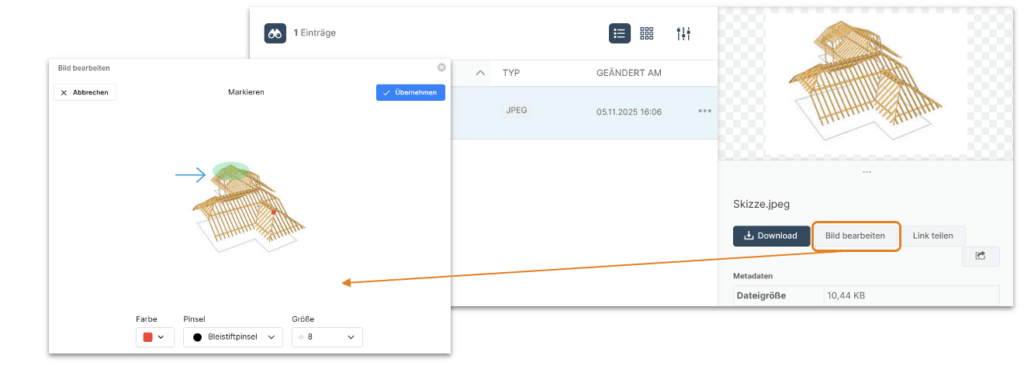
Since the February 2026 update, documents relating to projects, Bill of Quantities, cost planning and many other elements can be stored in NOVA AVA in an organized manner. This also includes photos and image files.
There is now a new feature for precisely this purpose: image files can now be edited directly in NOVA AVA, e.g. for markings.
Create Bill of Quantities via REST API
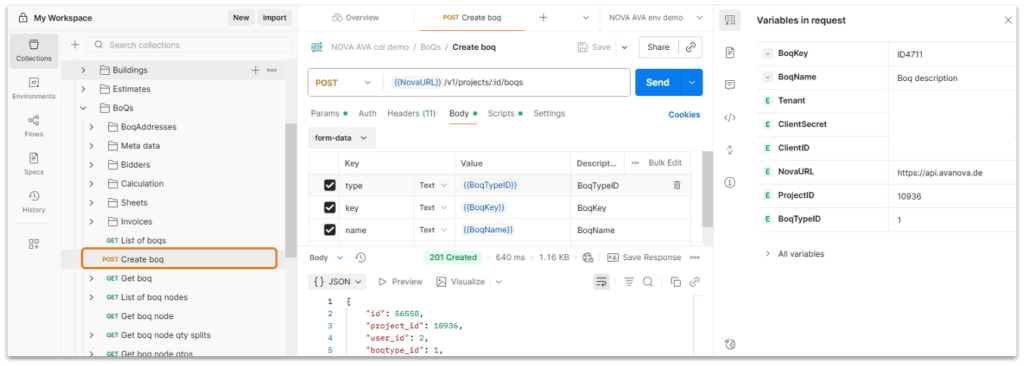
Web applications are ideally suited to automating data flows between systems. The modern REST API standard is used here. And with the February 2026 update, we have expanded this in NOVA AVA for the “remote-controlled” creation of BOQs. This means that not only projects can be created from third-party systems, but also the BOQs (VE) directly.
More security with single sign-on (SSO)
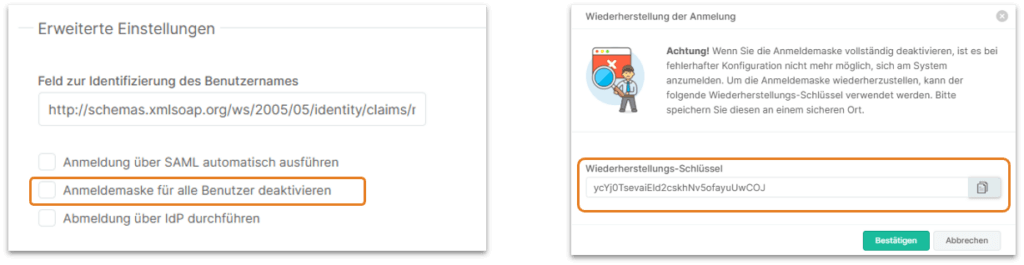
With Single Sign-On (SSO) via SAML, the standard login screen with username/password can now be completely deactivated for all users. When the option is activated, a recovery key is displayed, which you should definitely save/note!
Only with the help of this recovery key and the recover URL: “https://XXXXX.avanova.de/?s=user&m=loginRecover”, the login with user name/password can be restored.
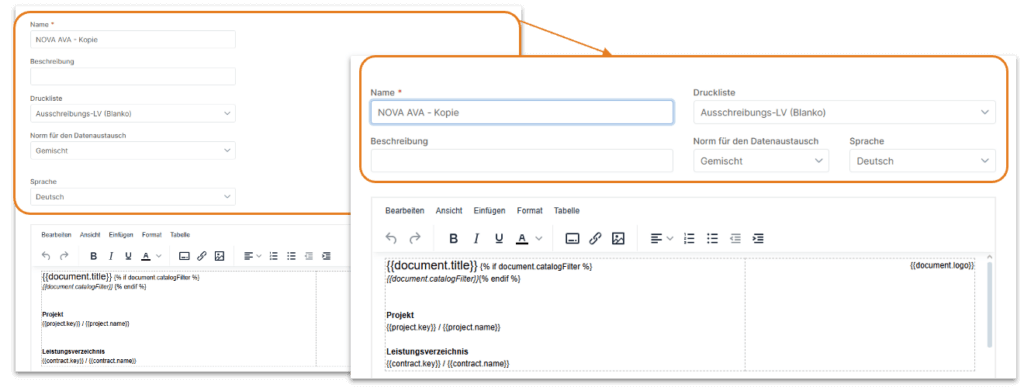
More space in the print designer
We have optimized the arrangement of some property fields in the print designer so that there is more space for the actual editing of the template since the February 2026 update.
Improvements must be made. And bugs out. Update February 2026.
| Features | For the new “URL” feature type, an icon for directly calling up the saved URL in a new browser tab has been provided in the properties dialogs next to the input field for the URL. |
| Addresses | Entries in the BOQ addresses were not saved under certain circumstances. This has been corrected. |
| Project participants | Contractors from LVs that have already been deleted can now be deleted manually in the list of project participants. |
| Project participants | The system address types (client, contractor, etc.) are now also available within the administration in the project participant types area and can be customized there. |
| Schedule | The hatching/background of weekends is now correctly displayed in the PDF printout of schedules. |
| Schedule | Under certain circumstances, duplicate pages were created for the schedules in the PDF output. This has been corrected. |
| GAEB interface | Items with the “Not applicable” attribute are now no longer exported at all during GAEB-XML-X83 export (request for quotation), as the “Not applicable” attribute is not permitted in GAEB-XML-X83. |
| Cost planning | BIM variables with spaces in their names can now also be easily inserted into the long text of calculation lines/items. |
| Cost planning | In model-based cost planning, the menu item “Save items to cost element” in the Edit menu sometimes had no function. Now it does. |
| Cost planning | In catalog-based cost planning (e.g. DIN276, LB,..) the function “Save items in cost element” was available in the Edit menu and has been removed, as this function is only functional in model-based cost planning. |
| Cost planning | When transferring DBD-BIM cost elements, an error message could appear under certain circumstances. This has been corrected. |
| Cost planning | From now on, calculation lines are always output at the set depth. |
| Cost analysis | The names of activated cost planning are now also displayed in the diagram view of the cost analysis. |
| Cost analysis | In the print list table view from the cost analysis, the placeholders for the additional addresses 1-4 are now correctly replaced and new placeholders for the name and description of the cost analysis are provided. |
| Cost analysis | In cost analyses with several grouping levels (catalogs), it could happen that values for the 2nd grouping level (catalog) were no longer displayed in displayed cost planning columns. This has been corrected. |
| Cost analysis | Different VAT rates in different invoices of a BOQ are now correctly taken into account in the BOQ-based gross cost analysis in the invoice approval column. |
| Cost analysis | The currency of cost analyses is now no longer taken from the global currency setting but from the currency set in the project. |
| LV creation | If there were no write permissions in a BOQ, clicking in the Source reference column to open the source BOQ directly led to nothing. Now it works. |
| LV creation | All placeholders from the BOQ information (header data, contract information, schedule overview) are now also correctly replaced in the long text. |
| Quantity determination | The jump behavior in the quantity pre-determination dialog between formula/text input and item number input has been improved. |
| Invitation to tender | If a CC address was also stored for a tender participant, this e-mail recipient could not request an access link to the tender. Now this works as expected. |
| Invitation to tender | A placeholder for the salutation field has been provided for the recipient of e.g. requests for quotations for the email templates: {{receiver.salutation}} |
| Invitation to tender | The overview of participants in the Invitation to tender module can now also be sorted by the “Invited on” column without errors. |
| Offer/award | Rebate, VAT and cash discount values entered in the bidder dialog were not displayed in the price comparison table immediately after saving. They are now. |
| Offer/award | Changes to the item attributes in the BOQ Creation module are now handled correctly in the Offer/Award module regardless of previously set variants (via column “V”). |
| Order/supplements | In the Order/Supplements module, the order forecast was not calculated correctly under certain circumstances. This has been corrected. |
| Order/supplements | When importing supplements, the order of the BOQ areas was incorrect under certain circumstances. This is now correct. |
| Measurement/MVE | Explanatory texts of calculation approaches in the quantity takeoff or in the measurement with a length of more than the 9 characters permitted by REB23.003/GAEB-XML are now exported correctly in the GAEB-XML-X31 export. |
| Corrections have been made to the totals calculation of the various levels in the sorted printout of cost plans. | |
| When the variables/quantities are output in the cost planning print list, they are now output in the order in which they are sorted in the dialog. | |
| The weekends in the scheduling output are now displayed with hatching for better differentiation. | |
| The list of BOQs in the “Invoice overview” print list of the project is now sorted by BOQ name / BOQ designation. | |
| New print option for quantity and price determination. This allows the list to be restricted to items with growth only. | |
| The “Continue next page” print option for the building description print list has been removed, but a new attribute “Page break before building description” has been implemented instead. This can be used to control whether a building description, including the associated heading, should be paginated to a new page or not. |
| The OZ of the respective text block is now also output in the printout for execution description text blocks. | |
| The placeholders of the cost planning amounts (net/VAT/gross) are now replaced with the respective values regardless of the sorting set in the cost planning printout. | |
| The placeholders for outputting the current outline level in user-defined headers have been made available for all BOQ print lists. |
| Administration | In the SAML settings, the arrangement of the fields Claim group, Role, BOQ has been optimized for better readability of the content. |
| Administration | Changes to a user’s default role now also take effect directly in an active user session. Previously, the user had to log out once and log back in again. |
| Administration | The creation of a new department with the transfer of data from another department sometimes led to an error message. This has been corrected. |
| Administration | The translations of the Lithuanian language have been made available in a revised version. |
| Administration | Adjustments have been made to the import of cost elements in the administration so that an error message no longer appears under certain circumstances when selecting cost elements in item cost approaches. |
| Administration | When exporting languages to CSV in the administration, you can now choose to export all or only your own translation keys for a language. |
| API | We have adapted the API with regard to the cost analysis to the current scheme of the project-specific and global cost analysis and corrected minor deviations in the forecast column. |
| Suppliers | Transferring an address from the address book multiple times as a new supplier no longer results in an error message. |
| General | The Chilean Peso / CLP currency has been included in the selection of currencies. |
| General | The automatic summer/winter time changes no longer have any effect on the end of submission or auction times. |
| Calculation | The calculation cost approaches (EKT) are now displayed correctly even in very large BOQ archives. |